The new and improved Kedyou experience
Max Anstie 5 min read
We’ve rebuilt the Kedyou room. Everything you already use is still there, but the room is now easier to arrange, works on your phone, has a dark mode, and has video calls that behave the way you’d expect. For Premium users, a room can now hold more than one workspace, including a brand new graphing calculator
This update is the culmination of years of groundwork, and I’m so happy I can finally bring it to you
Here’s a quick tour of what’s changed
🧩 A room you can arrange your way
The new room is built around your whiteboard. Down the left side is a column of icons for People, Chat, Files and Video. Click one to open that panel, and click it again to put it away. A closed panel takes up no space at all, so the whiteboard gets the whole screen when you need it
- Drag a panel by its tab to move it anywhere in the room
- Drag the edge of a panel to make it wider or narrower, or keep dragging to tuck that whole side away
- Kedyou remembers your layout on each device, so the room looks the same next time you open it
- If things get messy, choose Reset layout from the room menu at the bottom of the icon column
- Slimmer header bars give you more space without losing any features
New to the room? The [?] button in the bottom left runs our refreshed tutorial
🎥 Video calls that feel familiar
We’ve reworked video calls to work more like the video apps you already know
- The video call panel is open on the right of the room by default
- You can share your screen and keep your camera on at the same time. Your screen share gets a tile of its own
- Everyone’s tiles are laid out in a grid that fits the panel. Click any tile to put it in the spotlight. It fills the panel, and everyone else moves to a strip along the side, or underneath on a phone. Click it again to go back to the grid
- When someone starts sharing their screen, it moves into the spotlight automatically, unless you’ve already picked someone to focus on
- Every tile has a full-screen button in its bottom right corner
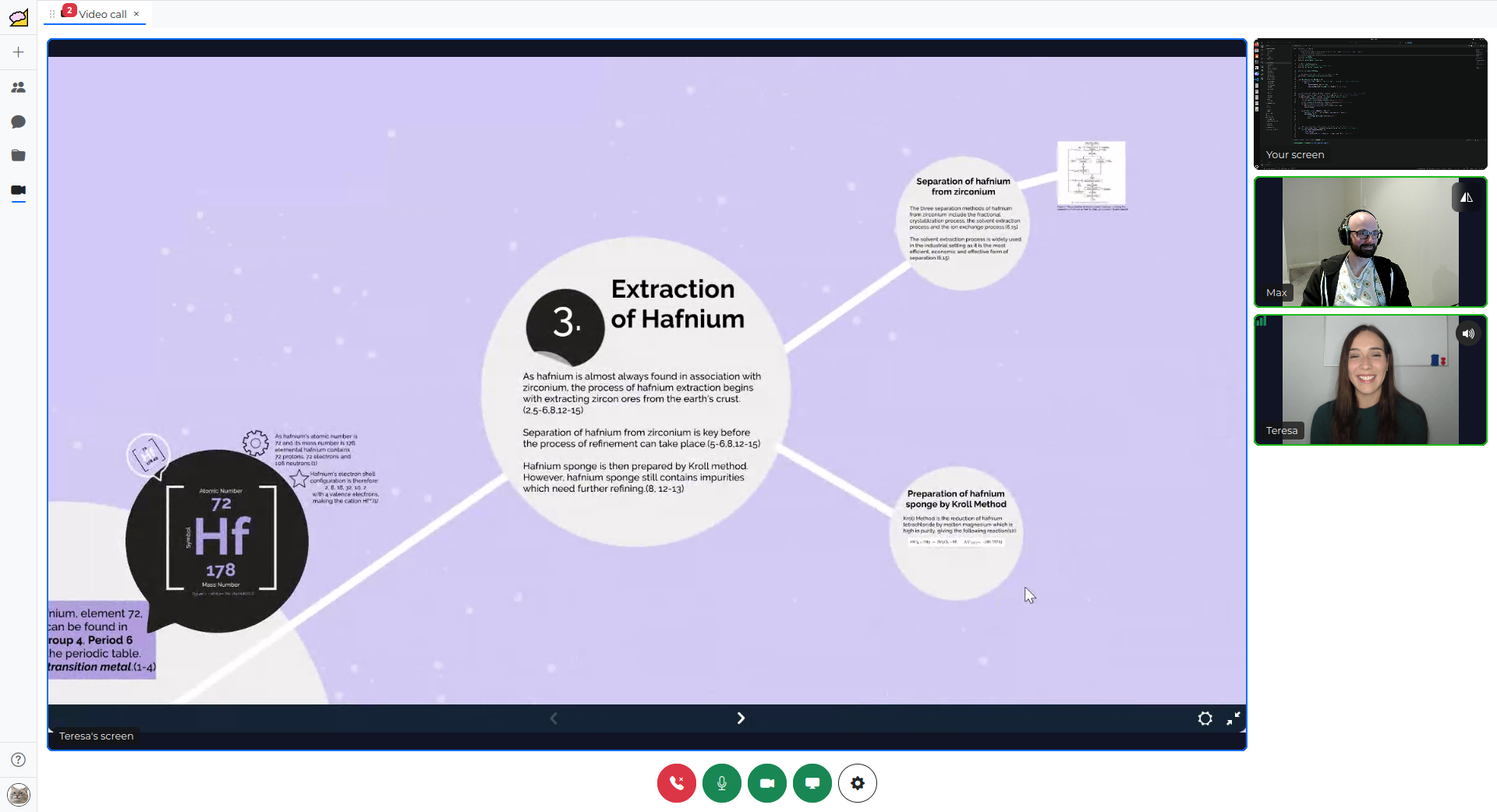
Video keeps playing while you rearrange the room, so you can move panels around mid-lesson without anyone dropping out
📱 Kedyou on your phone
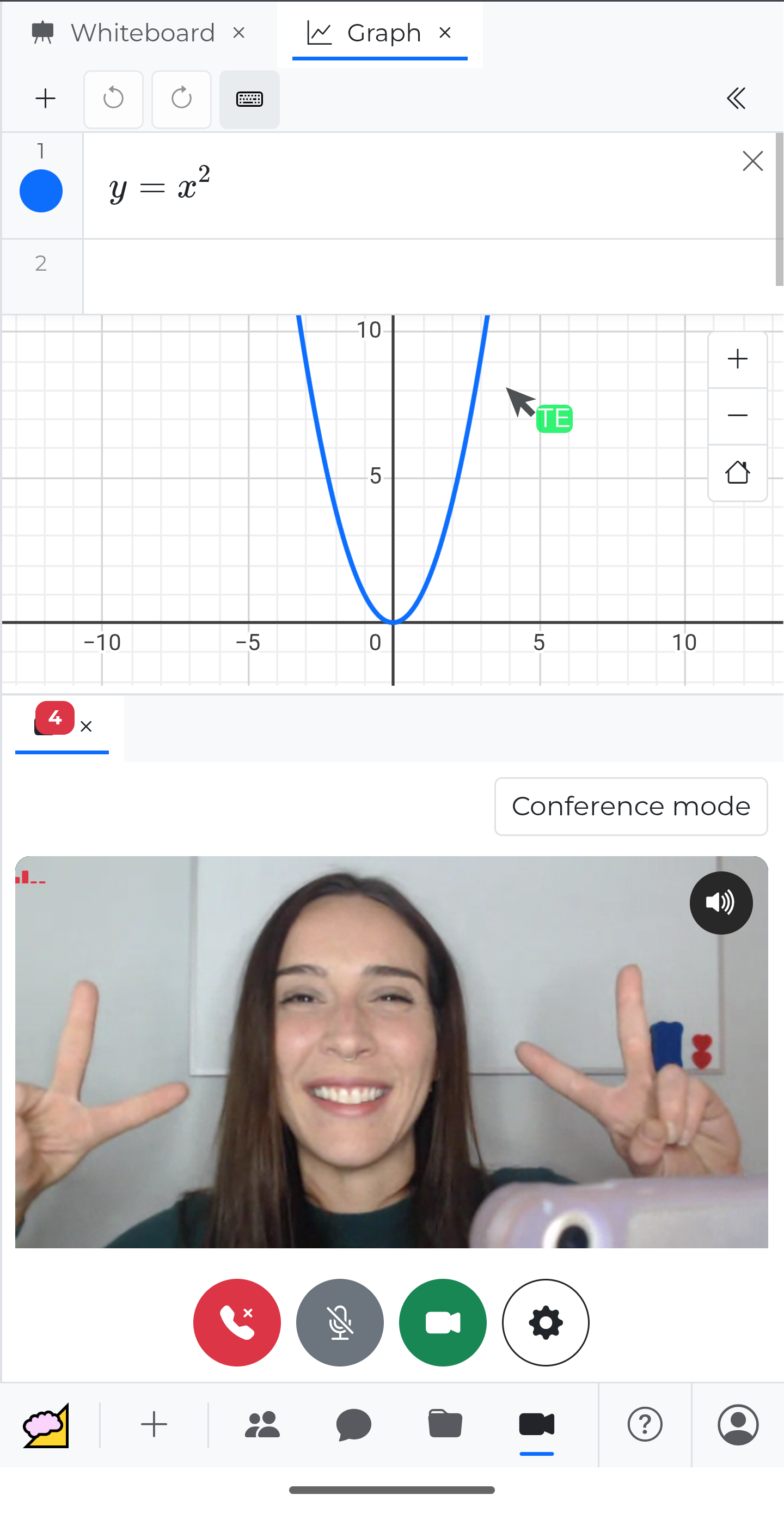
Rooms now work properly on phones and small tablets
On a small screen, the icons move to a strip along the bottom. Tapping one opens that panel as a tab next to your whiteboard, and tapping the Whiteboard tab takes you back to the canvas without closing anything. You can even turn your phone or tablet sideways in the middle of a call and the video keeps going
🌙 Dark mode
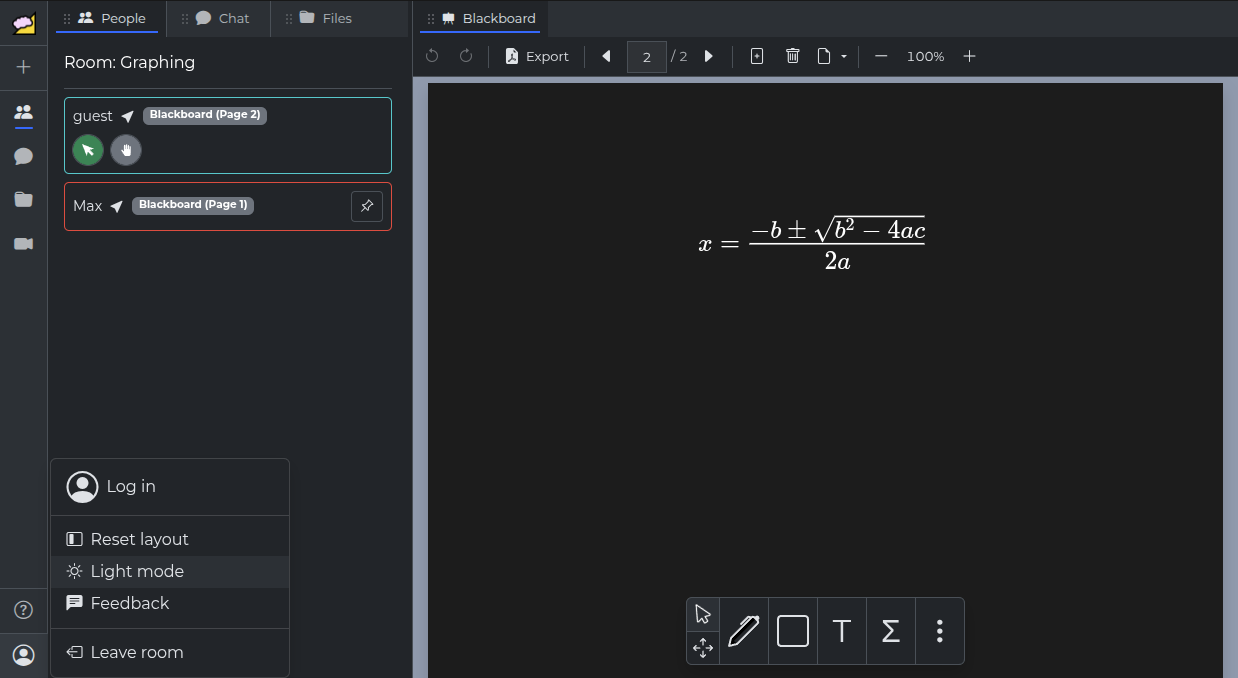
Rooms now support dark mode, which you can toggle from the room menu in the bottom left. Panels, menus, toolbars and the graph all go dark, while your whiteboard pages stay white, so handwriting, uploaded PDFs and everyone’s colours look exactly the same as they do in light mode
⭐ New for Premium: multiple workspaces
Until now, every room had a single workspace: the whiteboard and its pages
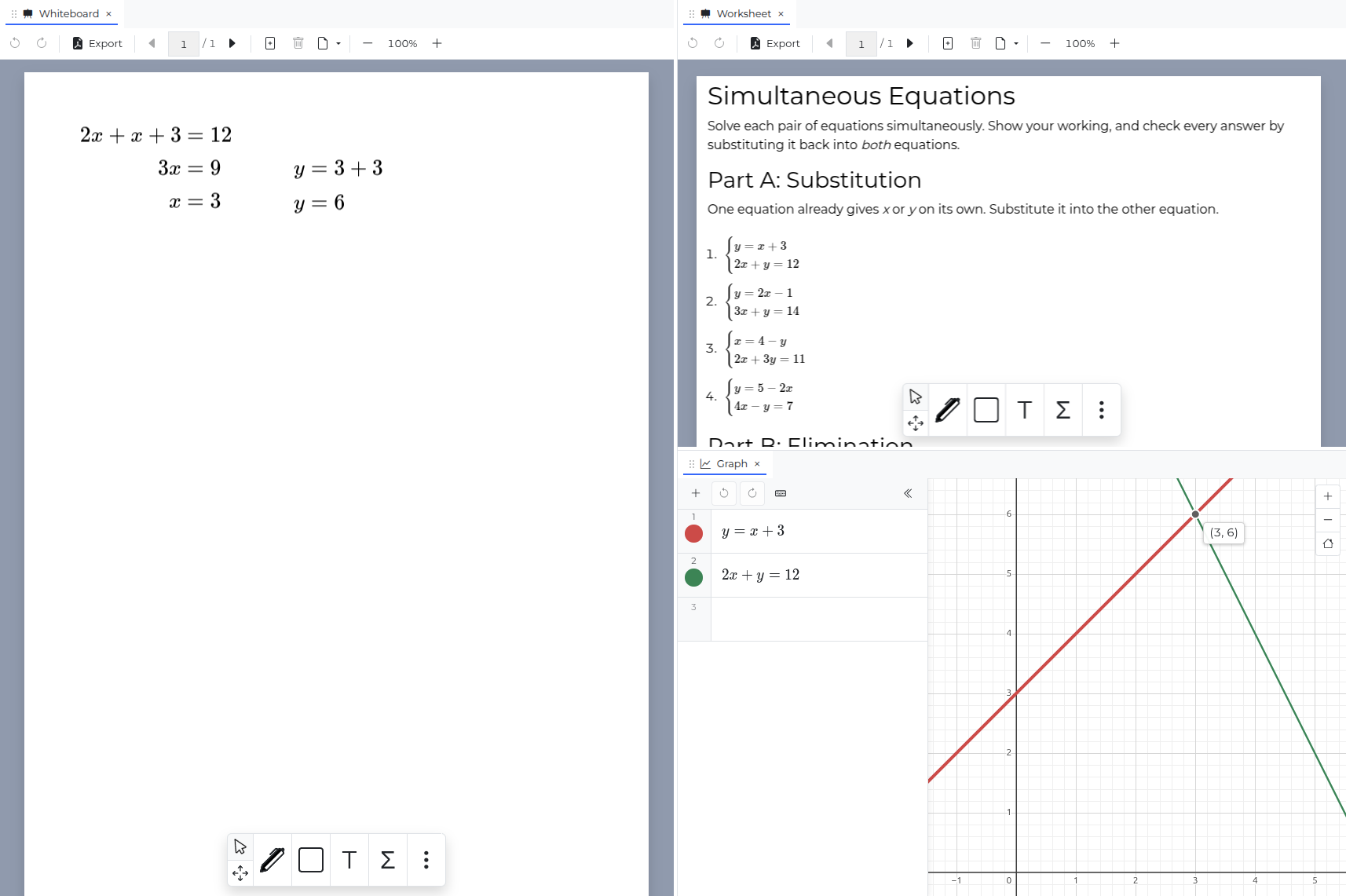
Premium rooms can now hold more than one workspace. Click the [+] button in the icon column to add another whiteboard or a graph, and each one gets its own tab along the top of the room
- Right-click a workspace tab to rename it, so “Homework”, “Practice exam” and “Graphs” can all live in the same room
- Close a workspace when you’re finished with it. Nothing is lost - you can reopen it from the same [+] menu, or delete it for good
- Everyone in the room can be on a different workspace. The People panel shows where each person is, like Whiteboard (2) for page two of the whiteboard, and following someone takes you to whichever workspace they’re on
- Each workspace has its own undo and redo, so undoing a change on your graph never rubs out something on your whiteboard
- Followers will have their views switched to whichever workspace you hovered if they do not already have it in view
Thanks to the new layout, you can also drag workspaces side by side, so you can get creative with how you work
These features come with the room, not the person. If you’re a tutor with Premium, every student who joins your rooms can use them too, without a subscription of their own
📈 New for Premium: graphing
The new Graph workspace is a graphing calculator that everyone in the room can use together. Type an equation into the list on the left and it’s drawn for everyone
- Graph functions like y = x² or x = sin(y), and shapes like x² + y² = 25
- Define values and functions in one row and use them in others
- Drag variable sliders and watch the graph change, which is a great way to show students what each part of an equation does
- Hover over a curve to read off its coordinates. The point snaps to where curves cross each other and the axes, so finding intersections and intercepts takes one move of the mouse
- Change a curve’s colour from the swatch beside it
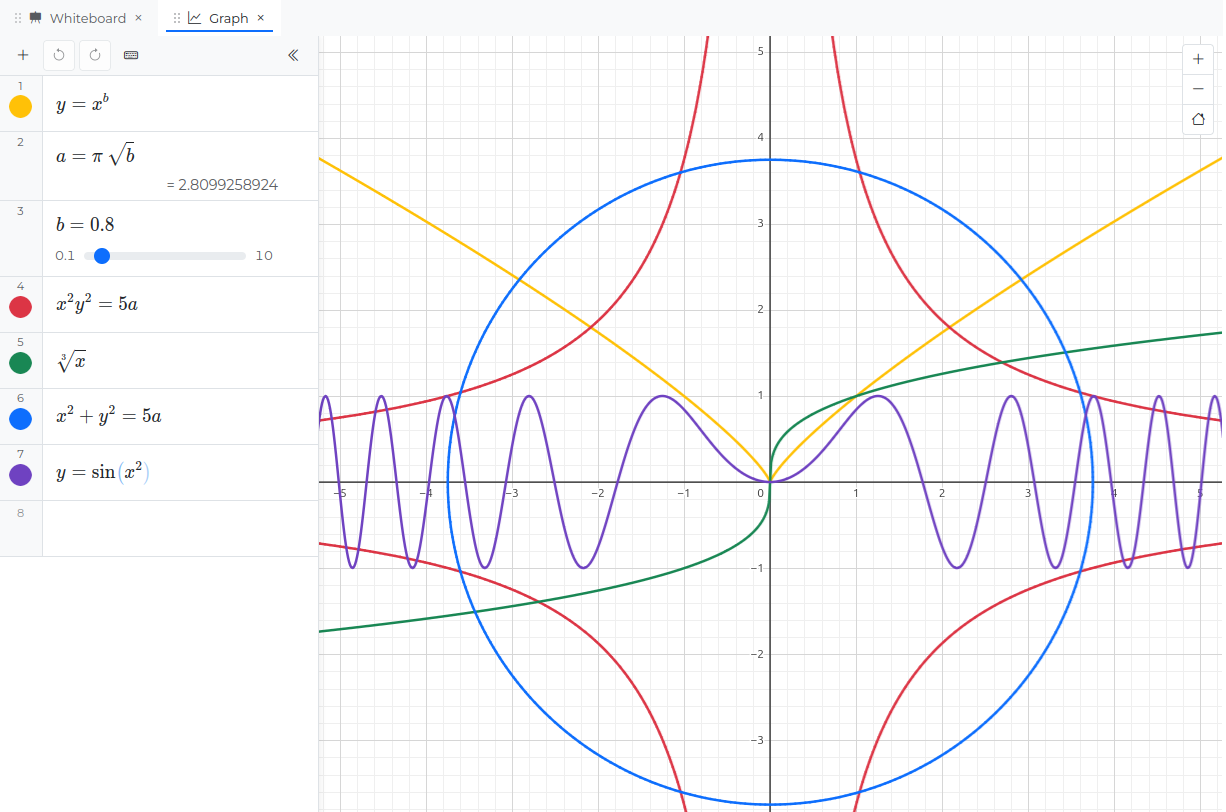
Everyone sees the same equations, but each person can pan and zoom on their own. When you point at something, your cursor lands on the same spot on the graph for everyone else, whatever they’ve zoomed to
🚀 Try it out
If you’re on the free plan, upgrade to Kedyou Premium to get multiple workspaces and graphing
We’d love to hear what you think of the new room, get in touch or select “Feedback” from the user menu

About Max Anstie
Max is the Chief Architect of Kedyou, and leads the technical implementation of our workspace features